- 10919 Stancliff Rd, Apt 4107 Houston, TX 77099
- [email protected]

Office Address
10919 Stancliff Rd, Apt 4107 Houston, TX 77099
10919 Stancliff Rd, Apt 4107 Houston, TX 77099
 by Nexi Bloom LLC

You have built your website on WordPress, or you are about to, and now you need somewhere to host it. You open a hosting company's website and find two options sitting side by side: "Shared Hosting" and "WordPress Hosting." Sometimes the WordPress plan costs more. Sometimes it costs less. The feature lists look almost identical. So what are you actually paying for?
It is a fair question, and a surprisingly hard one to get a straight answer to. WordPress powers about 40% of all websites, which makes it the biggest market in web hosting. Every hosting company wants a piece of it, and "WordPress hosting" has become a label that covers very different products.
Here is the honest summary this article builds towards: for most small business websites, the difference between good shared hosting and "WordPress hosting" is smaller than the marketing suggests, and many sites do not need to pay more. Some sites genuinely do benefit from a more expensive, fully managed service. The trick is knowing which one you are.
This guide explains what each type of hosting really is, compares them side by side, sets out who needs which, and flags the hidden costs to watch for before you buy.
The short answer
WordPress runs perfectly well on good shared hosting. "WordPress hosting" is usually shared hosting that has been set up for WordPress, with the software preinstalled and caching turned on. Managed WordPress hosting is a different, more expensive service, where the host takes care of updates, backups, staging, security and performance for you.
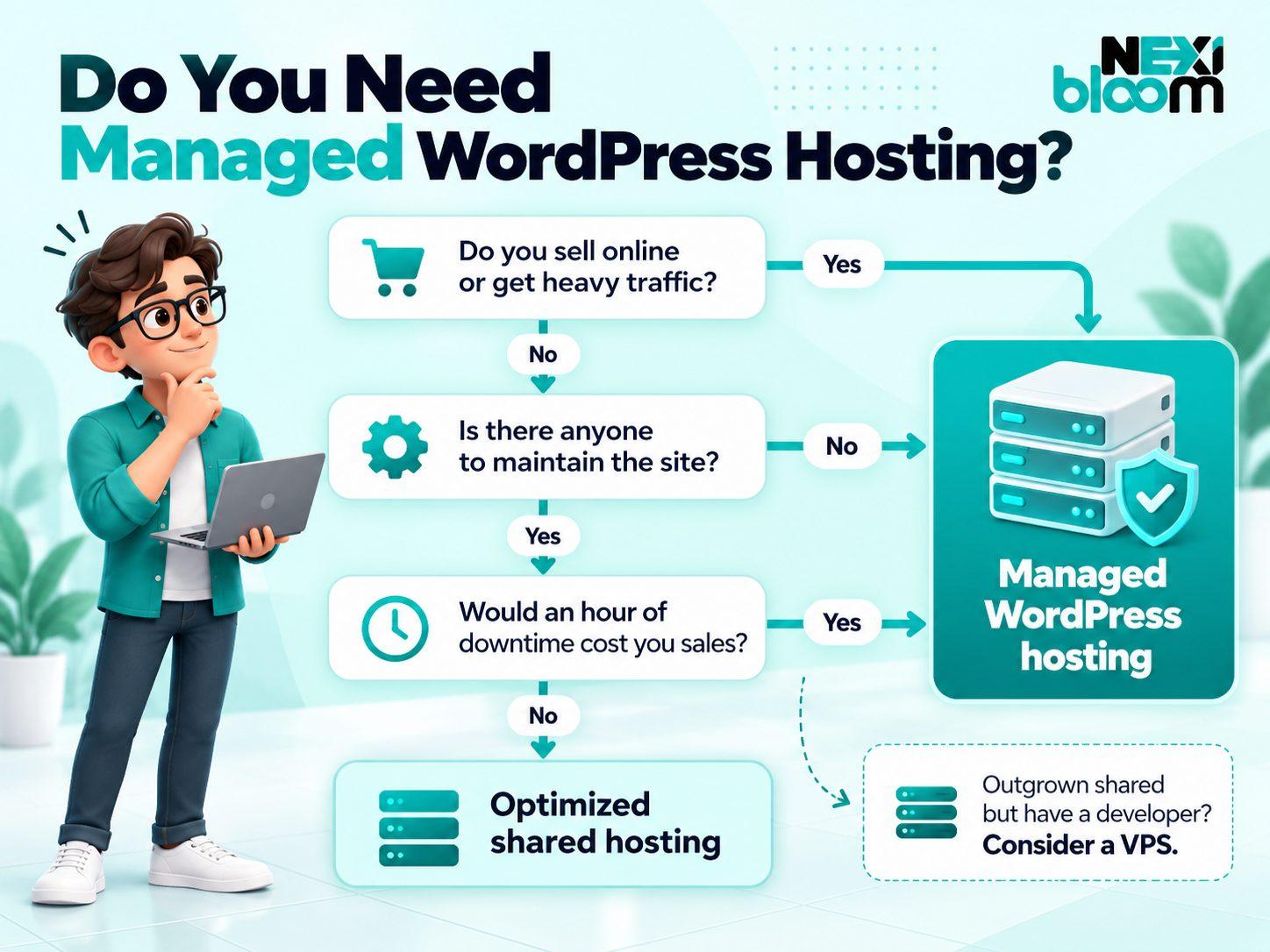
Choose managed WordPress hosting if you run an online store, get heavy or fast-growing traffic, or have no time or skills for maintenance.
Choose good shared or WordPress-optimized hosting if you run a brochure site, a local business website, a portfolio or a new blog. That covers most small businesses.
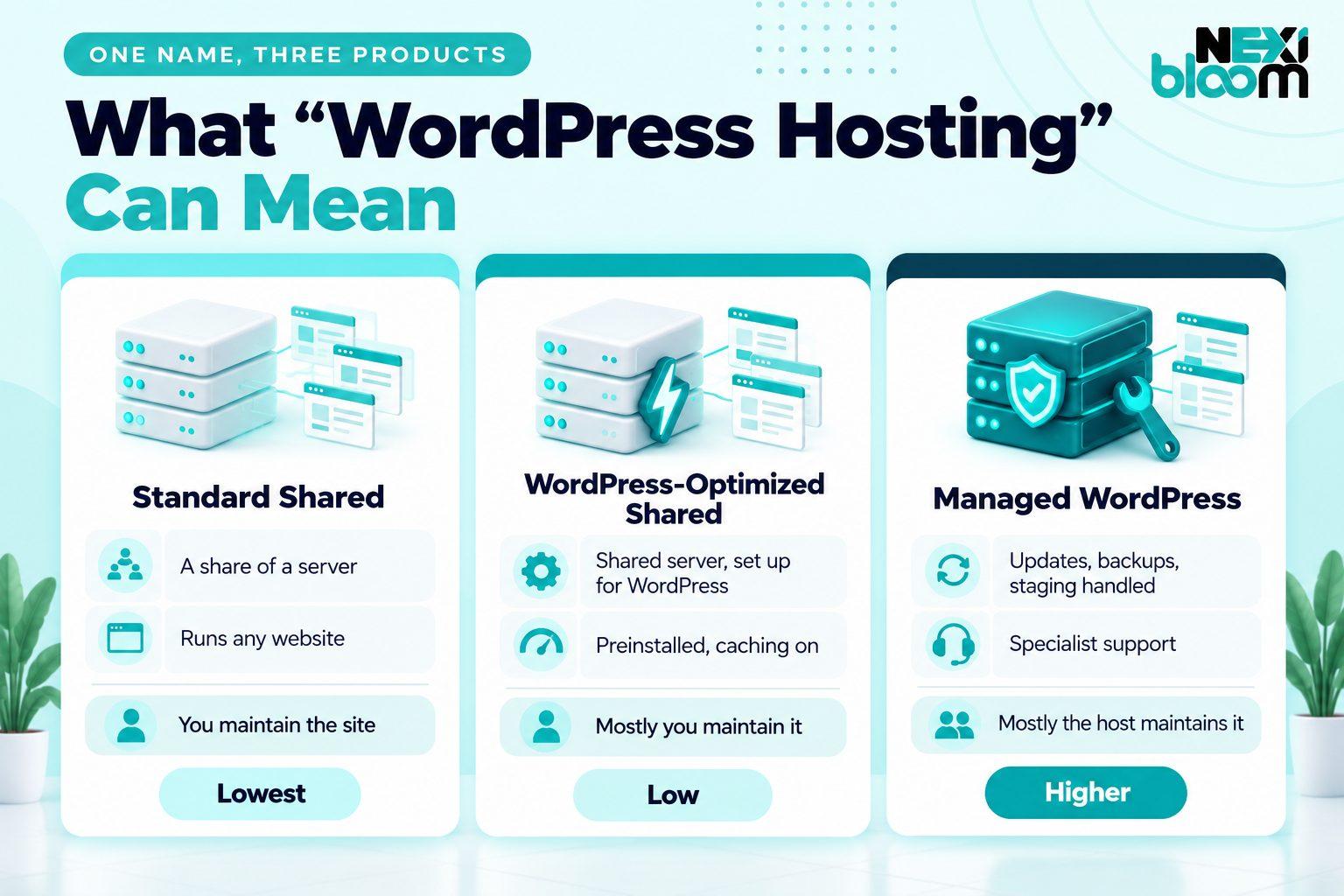
The main reason people struggle with this decision is that "WordPress hosting" does not mean one thing. In practice, you will come across three different products, and hosting companies do not always make clear which one they are selling.
Standard shared hosting is general-purpose hosting. Your site lives on a server alongside many other sites, and you can run almost any kind of website on it, including WordPress, which most hosts let you install in one click.
WordPress-optimized shared hosting is usually the same kind of shared server, set up specifically for WordPress. WordPress comes preinstalled, caching is configured for it, and the server may have WordPress-specific security rules. This is what most "WordPress hosting" plans actually are, particularly at lower prices.
Managed WordPress hosting is a genuinely different service. The host takes responsibility for much of the work of running a WordPress site: updating the software, testing those updates, backing up, protecting against attacks, keeping the site fast and fixing problems. It often runs on separate resources rather than a crowded shared server, and it costs noticeably more.
| Type | What you get | Who maintains the site | Typical price position |
|---|---|---|---|
| Standard shared hosting | A share of a server, runs any CMS | You | Lowest |
| WordPress-optimized shared hosting | Shared server set up for WordPress | Mostly you | Low |
| Managed WordPress hosting | WordPress-specific service and support | Mostly the host | Higher |
Once you know which of these three you are looking at, most of the confusion disappears. The real decision is usually not "shared or WordPress hosting," but "do I need someone else to manage my site, or not?"
Shared hosting is the most common type of web hosting, and for good reason. It is affordable, easy to use and more than capable of running most small websites.
A shared hosting server is a single powerful computer that hosts many websites at once. Every site on that server shares its resources, including processing power, memory and storage. The hosting company manages the server itself, including the hardware, the operating system and the network, while you manage your own website through a control panel.
Because the cost of the server is spread across many customers, the price per site is low. That is the main attraction.
Shared hosting is cheap and simple. Most plans include a control panel for managing files, databases and email, a free SSL certificate for HTTPS, email accounts on your own domain and one-click installs for popular software, including WordPress. It is also flexible. You can run WordPress, another content management system or a simple static site, and you can usually host more than one website on the same plan.
The trade-off is that you share. Every plan has limits on how much processing power, memory and storage your site can use, and many also limit the number of files, known as inodes. If your site regularly goes over those limits, it can slow down or show errors.
You may also hear about the "noisy neighbor" problem, where another site on the same server suddenly uses a lot of resources and slows everyone else down. Good hosts manage this carefully by limiting how much any one site can use, but it is a real risk on cheap, overcrowded servers.
Finally, maintenance is your job. The host keeps the server running, but updating WordPress, your theme and your plugins, and fixing anything that breaks, is up to you or your developer.
One myth worth clearing up straight away: you do not need special hosting to run WordPress. WordPress.org's recommended hosting requirements are PHP version 8.3 or greater, MySQL version 8.0 or greater or MariaDB version 10.11 or greater, and HTTPS support. Any reputable shared host meets those requirements. Millions of WordPress sites run happily on shared hosting.
For a small business website, a portfolio or a blog, a good shared hosting plan is often all you need. Our own shared hosting plans are built with exactly those sites in mind.
When a hosting company sells a plan called "WordPress Hosting," especially at a low price, it is usually WordPress-optimized shared hosting. That is not a bad thing. It just helps to know what you are buying.
WordPress comes preinstalled. You skip the setup step and start with a working site.
Caching is configured for WordPress. Caching stores ready-made copies of your pages so the server does not have to build them from scratch every time someone visits. Many WordPress plans use server-level caching such as LiteSpeed, often paired with a WordPress plugin that controls it. Done well, this makes a noticeable difference to speed.
WordPress-specific security settings. Some hosts add firewall rules that block common attacks on WordPress sites, such as repeated login attempts.
Sometimes automatic updates. Some plans update WordPress itself automatically. Fewer update your plugins and themes, and even fewer test those updates first.
This is the part the marketing tends to skip. WordPress-optimized shared hosting usually does not include someone else updating and testing your plugins, fixing your site when an update breaks it, a separate staging copy of your site to test changes, or guaranteed resources that are not shared with other sites. In most cases, you are still on a shared server, and you are still responsible for maintaining your site.
Read the feature list closely. If a plan includes staging, managed plugin updates with testing, malware removal and support from WordPress specialists, it is probably managed hosting. If it mainly lists preinstalled WordPress, caching, SSL and backups, it is WordPress-optimized shared hosting, whatever the name says.
Our own WordPress-optimized hosting plans fall into this second category, and we will explain exactly what they include later in this article.
Managed WordPress hosting is a step up in both service and price. You are paying the host to take on much of the work that would otherwise fall to you or a developer.
Managed updates. The host updates WordPress, and often your plugins and themes, for you. Better managed hosts test updates first and roll them back automatically if something breaks.
Staging sites. A staging site is a private copy of your website where you can test changes, such as a new plugin, a theme update or a redesign, before they go live. For businesses that cannot afford a broken site, this is one of the most valuable features.
Frequent backups with easy restores. Managed hosts usually back up daily or more often and let you restore your site with one click, sometimes to a specific point in time.
Performance tuning. Server-level caching, a content delivery network (CDN) that serves your site from locations closer to visitors, and servers configured specifically for WordPress.
Security and malware cleanup. Ongoing scanning, a web application firewall, and help cleaning up your site if it is ever hacked, which on cheaper plans is often a paid extra or your problem entirely.
Specialist support. Support staff who know WordPress well and can help with WordPress-specific problems, not just server issues.
Separate resources. Many managed hosts run each site in its own isolated environment, so a busy neighbor cannot slow you down, and they handle traffic spikes more gracefully.
Managed WordPress hosting is not better in every way.
It costs more. Often considerably more than shared hosting, especially as your traffic grows.
Some plugins are not allowed. Because the host handles caching, backups and security at the server level, many managed hosts ban plugins that duplicate those jobs or that put heavy load on the server.
Email is often not included. Many managed WordPress hosts do not provide email accounts, so you may need to pay for email separately.
You have less control. You usually cannot change server settings the way you might on a VPS, and the setup is WordPress only.
For the right site, those trade-offs are well worth it. For many small sites, they are paying for help they do not need.
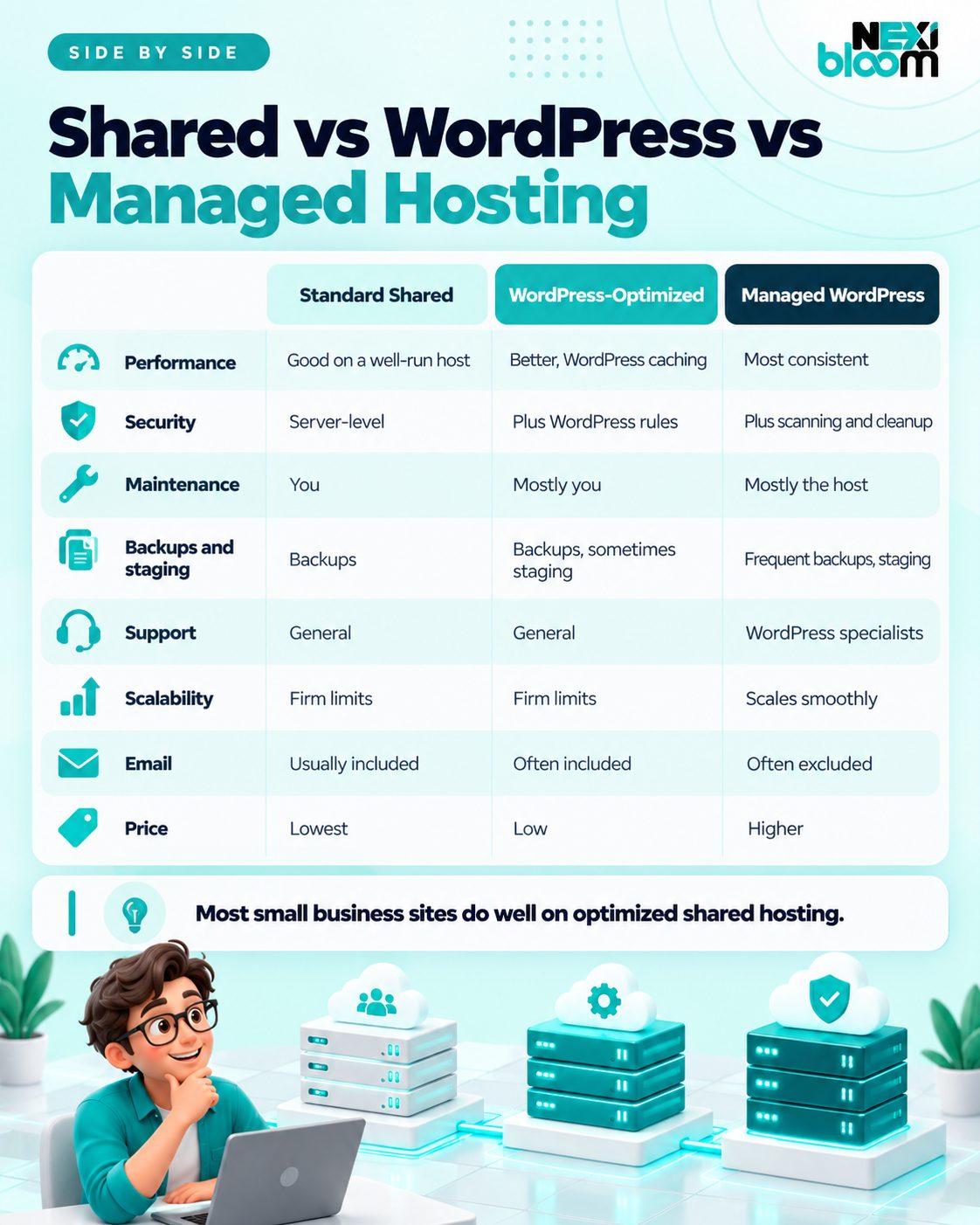
Here is how the three types compare on the things that matter most.
Speed matters for visitors and for search. One of the clearest measures of how quickly your server responds is time to first byte (TTFB), the time between a visitor requesting a page and the first piece of it arriving. Google's web.dev guidance says a good time to first byte is 0.8 seconds or less, and values above 1.8 seconds are poor.
Hosting affects that number directly. Overcrowded, cheap shared servers can struggle, while well-run shared hosting with server-level caching can be impressively fast. Managed WordPress hosting usually adds more consistent performance, a CDN and better handling of traffic spikes.
But here is the honest part: for most small sites, the biggest speed problems are not the hosting at all. Heavy themes, too many plugins, huge uncompressed images and page builders that load unnecessary code slow down far more WordPress sites than hosting does. Moving a bloated site to expensive hosting often helps much less than people hope.
All reputable hosts secure their servers. WordPress-optimized and managed plans add WordPress-specific protections, and managed hosts usually add malware scanning, firewalls and cleanup.
The single biggest factor in WordPress security, though, is keeping WordPress, themes and plugins updated and using fewer, well-maintained plugins. A carefully maintained site on shared hosting is usually safer than a neglected one on managed hosting.
On shared and most WordPress-optimized plans, maintenance is your job, or your developer's. That means updating regularly, checking that nothing broke and fixing it when something does. On managed hosting, much of this is done for you, often with testing and automatic rollback. This is the biggest practical difference between the three types.
Most decent hosts now include regular backups, but check the details: how often they run, how long they are kept, whether restoring costs extra and whether they are stored somewhere other than the same server. Staging sites are standard on managed hosting and rarer on shared plans.
Shared hosting support is typically good at server problems, such as email, DNS and access, but may not help with WordPress-specific issues. Managed WordPress support staff are usually WordPress specialists who can help diagnose plugin conflicts and performance problems.
Shared hosting has firm resource limits. If your traffic grows steadily, you will eventually hit them. Managed WordPress hosting usually scales more smoothly, often at a higher price as traffic grows. A VPS sits in between, which we cover below.
Shared hosting usually includes email accounts and lets you run any kind of site. Managed WordPress hosting often excludes email and runs only WordPress. If you rely on hosting-provided email, factor that in.
Price is where the three differ most, and where comparisons get slippery. Many hosts advertise a low introductory price that rises at renewal, and the difference can be significant. Some also charge extra for things such as restoring backups, migrations or additional sites.
As one concrete example, our own plans are published openly. Our WordPress-optimized plans start at $3.99 a month for a single site, and our shared hosting plans start at $4.99 a month. Managed WordPress hosting from other providers generally costs more, often considerably more, so always compare the renewal price and what is included, not just the headline figure.
| Factor | Standard shared | WordPress-optimized shared | Managed WordPress |
|---|---|---|---|
| Performance | Good on a well-run host | Better, with WordPress caching | Most consistent, often with CDN |
| Security | Server-level protection | Plus WordPress-specific rules | Plus scanning and cleanup |
| Maintenance | You | Mostly you | Mostly the host |
| Backups and staging | Backups, rarely staging | Backups, sometimes staging | Frequent backups, staging |
| Support | General hosting | General hosting | WordPress specialists |
| Scalability | Firm limits | Firm limits | Scales more smoothly |
| Email and flexibility | Email included, any CMS | Email often included | Email often excluded, WordPress only |
| Price | Lowest | Low | Higher |
Managed WordPress hosting earns its price for sites where problems are expensive or where nobody has time to look after the site.
Online stores. If you sell through WooCommerce and every hour of downtime or every slow checkout costs you sales, managed hosting's performance, backups and support are worth paying for.
High-traffic or fast-growing sites. If your traffic is large, spiky or growing quickly, the separate resources and scaling of managed hosting avoid the limits of shared plans.
Owners with no time or skills for maintenance. If you have no developer and no interest in updating plugins or fixing problems yourself, managed hosting takes that work off your plate. For some business owners, that peace of mind is the whole point.
Agencies managing many client sites. Staging, easy backups and specialist support save agencies a great deal of time.
Sites where a hack or outage would be costly. Membership sites, booking systems and sites that handle sensitive information benefit from the extra protection and faster recovery.
If your site fits one or more of these descriptions, managed WordPress hosting is likely to be money well spent.
Now for the part most hosting companies would rather not say out loud: many small business websites do not need managed WordPress hosting.
If your site is a brochure site that explains your services and gets people to call or fill in a form, a local business website for a plumber, dentist, law firm or accountant, a portfolio, a new blog or a small nonprofit site, good shared or WordPress-optimized hosting will almost certainly serve you well. These sites have modest traffic, do not process payments and do not change much from week to week.
What they do need is a simple maintenance routine:
That routine takes perhaps an hour a month. For many small businesses, it is far cheaper than managed hosting, and a developer can handle it for you if you would rather not. If you are planning a new site, our guide on what to expect from WordPress development covers how maintenance fits into the bigger picture.
Shared hosting is not forever. These are the signs it is time to move up:
Upgrading before you need to means paying more every month for capacity and services you are not using. Worse, if your site is slow because of a heavy theme or too many plugins, moving to expensive hosting may barely help. Fix the site first, then decide.
And if you do outgrow shared hosting, managed WordPress hosting is not the only next step. For many growing sites, a VPS offers guaranteed resources at a lower price, as long as you or your developer are comfortable managing it.
Before you pay for an upgrade, it is worth finding out whether your hosting is actually what is slowing your site down. You can do a useful check yourself in about 20 minutes, using free tools.
Run your site through Google's PageSpeed Insights. Enter your homepage address and look at the results. Among other things, the report shows how quickly your server responded. If that number is consistently high, above the 0.8-second guideline mentioned earlier, your hosting may be part of the problem.
Test a simple page as well as a heavy one. Compare your homepage, which may be full of sliders, videos and plugins, with a plain page such as your privacy policy. If the plain page loads quickly and the heavy page does not, the problem is more likely your theme, plugins or images than your hosting. If even the plain page responds slowly, the server is the more likely cause.
Test at different times of day. Shared servers can be slower at busy times. If your site is fast in the morning and sluggish in the evening, that pattern points to server load.
Check Search Console's Core Web Vitals report. If you use Google Search Console, its Core Web Vitals report shows how real visitors experience your pages over time, grouped into good, needs improvement and poor. It is a better long-term picture than any single test.
Ask your host. A good host will tell you whether your site is hitting its resource limits and what is using them. If your site is regularly running out of resources, that is a clear sign to upgrade or optimize.
If the tests point to your theme and plugins, fix those first. It is cheaper, and it will make your site faster on any hosting you choose later.
A few beliefs come up again and again when people choose hosting. Here are the most common, and the reality behind each.
"You need WordPress hosting to run WordPress." You do not. Any host that meets WordPress's basic requirements can run it well. WordPress hosting makes setup easier and often adds caching, but it is not a requirement.
"Unlimited means unlimited." Plans advertised as unlimited storage or bandwidth almost always have fair use policies and hidden limits on processing power, memory or files. If a site uses more than its share, the host will slow it down or ask you to upgrade. Read the terms.
"More expensive hosting is always faster." Not necessarily. A well-run, affordable host with good caching can outperform an expensive one, and no hosting plan can fully rescue a site weighed down by a heavy theme and dozens of plugins.
"Managed hosting means I never have to do anything." Managed hosting takes care of the technical upkeep, but your content, your plugin choices, your design and your site's usefulness to customers are still your responsibility. It reduces the work. It does not remove it.
"Shared hosting is only for hobby sites." Plenty of successful small businesses run on shared hosting for years. For a site with modest traffic and a sensible maintenance routine, it is a perfectly professional choice.
Hosting companies sometimes suggest that their WordPress plans will improve your search rankings. The truth is more modest.
What matters:
What mostly doesn't:
Good hosting removes obstacles. It does not create rankings. Your content, your site structure, your reviews and your local presence do far more for your SEO than your hosting plan. We explore how hosting quality affects trust and search in more depth in why reliable hosting shapes how customers see your brand. If rankings are the goal, our WordPress SEO services cover the site-level work that actually moves them.
The headline price is rarely the whole story. Before you buy any hosting plan, shared or managed, check these points:
A plan that looks cheap can become expensive once you add the extras you need. Over the life of a website, those costs add up, which we look at in more detail in what WordPress actually costs over five years.
There is a middle ground between shared hosting and managed WordPress hosting that many comparisons skip: the virtual private server, or VPS.
A VPS gives you a guaranteed slice of a server's resources that are not shared with other customers, along with more control over how the server is set up. It is a common next step for sites that have outgrown shared hosting but do not need, or do not want to pay for, fully managed service.
The trade-off is responsibility. A VPS gives you more power, but someone has to configure and maintain it. That suits businesses with a developer or technical staff, agencies and sites with specific technical needs. If that describes you, VPS hosting can offer more performance for the money than managed WordPress hosting. For very large sites, dedicated servers are the next step beyond that.
If you are still unsure, answer these five questions honestly.
Whichever type of hosting you lean towards, these questions will tell you a lot about the provider:
A good host will answer all of these clearly. Vague answers, especially about limits and renewal prices, are a warning sign.
The good news is that this decision is not permanent. Most sites start on shared hosting and move up if and when they need to. When you move, take a full backup first, test the site on the new host before switching, lower your domain's DNS time-to-live a day or so in advance so the change takes effect quickly, and check forms, email and checkout carefully after the move. Many hosts, including us, will help with the migration.
Since we sell hosting ourselves, it would be strange not to explain where our plans fit.
Our WordPress hosting plans are WordPress-optimized shared hosting. They are not fully managed WordPress hosting. Each one includes a free SSL certificate, daily backups, LiteSpeed caching and 24/7 support:
Our shared hosting plans also run on SSD servers with LiteSpeed caching, daily backups and free SSL, and include email accounts and our Nexipanel control panel. They range from Nano Bloom at $4.99 a month to Micro Bloom at $7.99 a month for up to 20 websites and Mega Bloom at $14.99 a month for up to 50 websites.
For sites that have outgrown shared hosting, our VPS hosting offers dedicated resources and more control.
Answer the five questions in the checklist above. If you run a small business website, a portfolio or a blog, you will most likely find that good shared or WordPress-optimized hosting is all you need, with a simple monthly maintenance routine. If your site sells online, gets heavy traffic or has nobody to look after it, managed hosting or a VPS is worth the extra cost.
If you would like help deciding, or you are planning a new site, our team offers WordPress website development and hosting that fits the site you actually have.