- 10919 Stancliff Rd, Apt 4107 Houston, TX 77099
- [email protected]

Office Address
10919 Stancliff Rd, Apt 4107 Houston, TX 77099
10919 Stancliff Rd, Apt 4107 Houston, TX 77099
 by Nexi Bloom LLC


Every month, the invoice arrives. Every month, a report arrives too, full of charts, colored arrows and words like "visibility" and "authority." And every month, you look at your phone, your inbox and your bank account and wonder whether any of it is actually turning into customers.
If that sounds familiar, you are not alone, and you are right to ask the question. SEO is one of the few services where many business owners pay for months without being sure what they are getting. Part of the difficulty is that what SEO costs in Houston varies so widely that there is no standard price to compare against.
This article is not a sales pitch. It is written to help you judge your current agency fairly, and it is entirely possible you will finish it and conclude that they are doing a good job. That is a perfectly good outcome. What matters is that you know, rather than hope.
Below, you will find the six reports to ask for by name, what a good and a bad version of each looks like, the exact questions to send, and a step-by-step guide to checking Google Search Console yourself in about 15 minutes.
Key takeaways
- Judge your agency on results, not on how busy the report looks.
- Ask for six specific reports by name. A good agency will not mind.
- Filter your own brand name out of the numbers, or they will flatter the work.
- Learn to check Search Console yourself. It is free and takes minutes.
- Always own your accounts, whatever happens with the agency.
Before you judge anyone, it helps to agree what "working" looks like, because SEO does not move in a straight line.
Some numbers move early. These are leading indicators: more of your pages being indexed by Google, your site appearing in more searches (impressions), and better rankings for less competitive terms. They show that the groundwork is paying off, even before much extra business arrives.
Other numbers move later. These are lagging indicators: more clicks from people who did not already know your name, more calls and form submissions, and ultimately more revenue. They are what you are really paying for, but they take longer.
In the first few months, most of the work is foundational, such as fixing technical problems, improving key pages and setting up your Google Business Profile properly. Movement in leading indicators usually shows within a few months. Competitive searches take longer, sometimes much longer.
So "working" does not mean "doubled leads in eight weeks." It means the right early signs are appearing on a sensible schedule, and they are gradually turning into more of the right customers. More traffic from people who will never buy from you is not success. More calls from the kind of customers you want is.
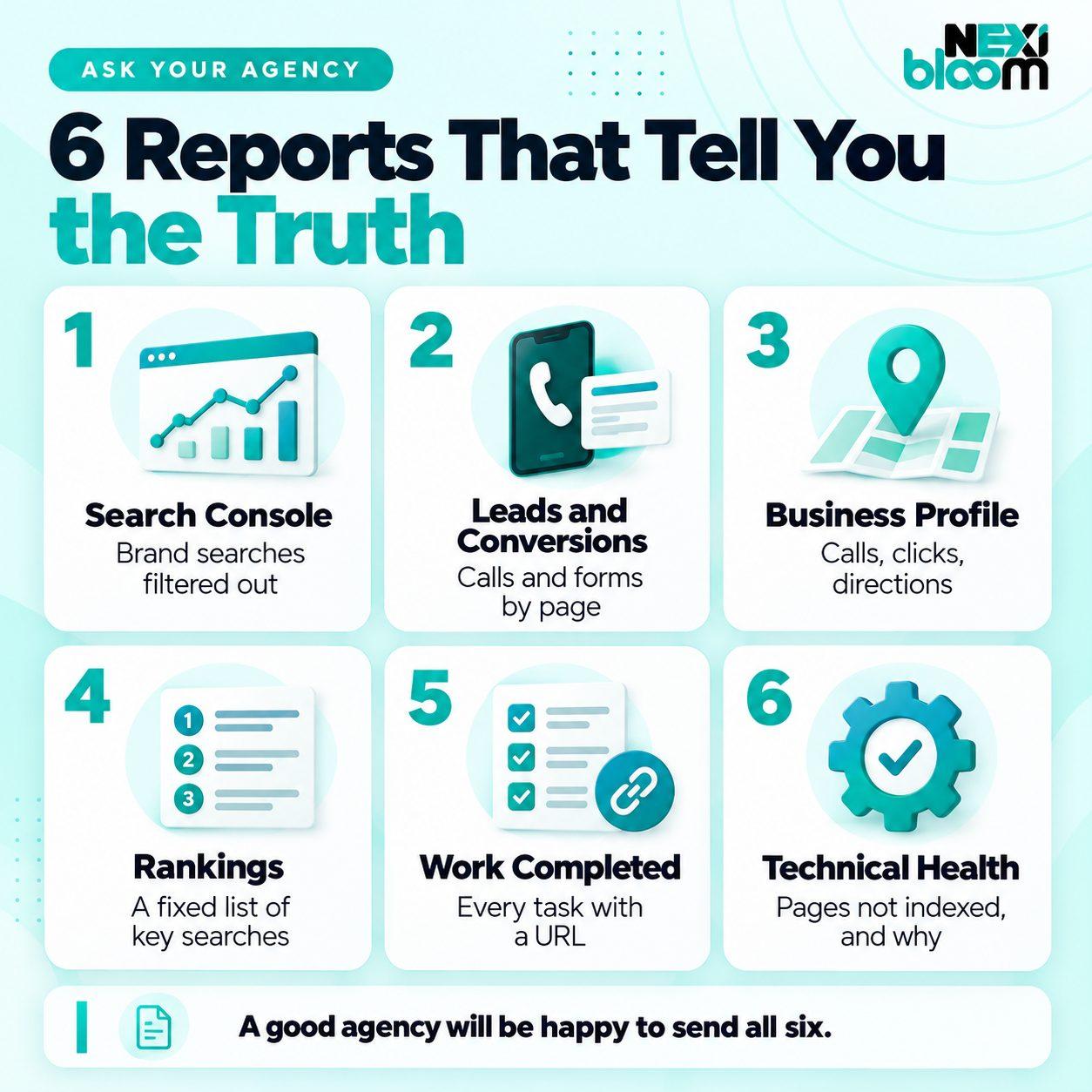
Any competent agency should be able to produce all six of these reports, or the data behind them, without difficulty. For each one, you will find what it shows, what a good version looks like, what a bad version looks like, and the exact question to ask.
What it shows. Google Search Console is Google's free tool for site owners, and its Performance report is the most honest record of how your site does in search. It shows clicks, impressions, click-through rate and average position, broken down by the searches people used and the pages they landed on. You can read Google's own definitions of clicks, impressions, CTR and position if any of those terms are unfamiliar.
What a good version looks like. The data comes straight from Search Console, either as an export or a screenshot, not from a third-party tool's estimate. It compares a recent period with the same period last year, so seasonal ups and downs do not mislead you. Most importantly, it filters out searches that include your company name. People searching for you by name were going to find you anyway. The searches that remain are the ones the SEO work is responsible for winning. A good report also points out which pages grew and why.
What a bad version looks like. A traffic total from a tool that estimates visits rather than measuring them. Numbers that include your brand searches and so make growth look bigger than it is. Month-on-month comparisons that credit the agency for normal seasonal changes. Or no Search Console data at all.
The question to ask:
"Please send a Search Console performance export for the last three months compared with the same period last year, with searches containing our brand name filtered out."
What it shows. How many calls, form submissions, bookings or sales came from organic search, and which pages they came from. This is the report that connects SEO to your business.
What a good version looks like. Leads from organic search counted separately from ads, social media and referrals. Each lead tied to the page it came from, so you can see which content earns business. Call tracking set up properly, so phone enquiries are counted as well as forms. In Google Analytics 4, the actions that matter to you, such as form submissions and calls, are set up as key events rather than left untracked. Where possible, the report also shows what kind of leads they were, because ten small jobs are not the same as ten large ones.
What a bad version looks like. Plenty of "sessions," "engagement rate" and "time on page," but no leads at all. Leads from every channel lumped together, so you cannot tell which ones SEO produced. Or the line "conversion tracking isn't set up yet" several months into the contract.
The question to ask:
"How many calls and form submissions came from organic search this month, and from which pages?"
If your agency cannot answer that question, nobody can tell you whether the SEO is working, including them.
What it shows. For any business that serves a local area, the Google Business Profile often brings in more contacts than the website itself. Google shows the performance data for your Business Profile, including calls, website clicks, direction requests and the searches people used to find you.
What a good version looks like. Calls, website clicks and direction requests shown month over month and year over year. A note on which searches found you. And a short summary of what changed on the profile that month, such as new photos, posts, services or review replies. In review-driven industries like roofing, where customers often search after storm damage, a strong roofing SEO reviews strategy can set a company apart in the Map Pack.
What a bad version looks like. A single "views" number with no actions. No profile report at all for a local business. Or a profile the agency controls but you cannot log into.
The question to ask:
"Please include our Business Profile performance: calls, website clicks and direction requests, compared with the previous period and the same period last year."
What it shows. Where your site ranks for the searches that actually bring you business, tracked the same way every month.
What a good version looks like. A list of perhaps 10 to 30 searches that you and the agency agreed on together, focused on the services you most want to sell and the areas you serve. The list stays the same from month to month, so you can see real progress. For local businesses, rankings are checked from consistent locations, because results change depending on where the searcher is standing. Some agencies show this as a grid across your service area, which is even better.
What a bad version looks like. "We now rank for 1,200 keywords." Most of those will be searches that nobody makes, or searches that would never lead to a sale. Rankings for long, obscure phrases presented as wins. Or a list that quietly changes each month, so the terms that dropped disappear and new, easier terms take their place.
The question to ask:
"Can we agree a fixed list of the searches that matter most to our business, and track only those every month?"
What it shows. What was actually done on your account this month.
What a good version looks like. An itemized list where every piece of work has a link you can click and check. New pages, with their URLs. Pages that were changed, with a note on what changed. Technical fixes, with the problem and the fix. Links earned from other websites, with the address of the page that links to you. Google Business Profile updates, with dates.
What a bad version looks like. "Ongoing optimization." "Link building in progress." "Continued to monitor performance." None of these can be checked, which means none of them can be held to account. Another warning sign is a long list of links from websites you have never heard of, with nothing to do with your industry or area.
The question to ask:
"Please list every change and new page from this month with the URL for each, and every link earned with the address of the linking page."
This single report tells you more than any other about whether real work is happening. Good agencies are usually proud to send it.
What it shows. Whether Google can find, crawl and index your important pages, and whether the site has technical problems holding it back.
What a good version looks like. A short, plain-language summary drawn from Search Console's Page indexing report, showing how many of your important pages are indexed, which ones are not and why. A list of technical problems found, fixed and still open. Notes on site speed and mobile usability where they matter. Google itself notes that not every URL on a site needs to be indexed, only the important ones, so a good report focuses on the pages that matter to you.
What a bad version looks like. An automatically generated "site health score" of 97 out of 100 with no explanation. Hundreds of minor warnings with no priorities. Or no technical reporting at all, even though your site is slow or pages are missing from Google.
The question to ask:
"Which of our important pages are not indexed, and why?"
Technical SEO is closely tied to how your website is built. If the same problems appear month after month, the fix may involve the site itself, which is one reason your website and SEO should never be separated.
| Report | A good version shows | A bad version shows |
|---|---|---|
| 1. Search Console performance | Raw data, brand searches removed, compared with last year | Tool estimates, brand traffic included |
| 2. Leads and conversions | Calls and forms from organic search, by page | Sessions and engagement, no leads |
| 3. Business Profile performance | Calls, clicks, directions, trends | Views only, or nothing |
| 4. Rankings | A fixed list of commercial searches | Thousands of keywords, a changing list |
| 5. Work completed | Every task with a URL | "Ongoing optimization" |
| 6. Technical health | Indexing problems found and fixed | A score with no explanation |
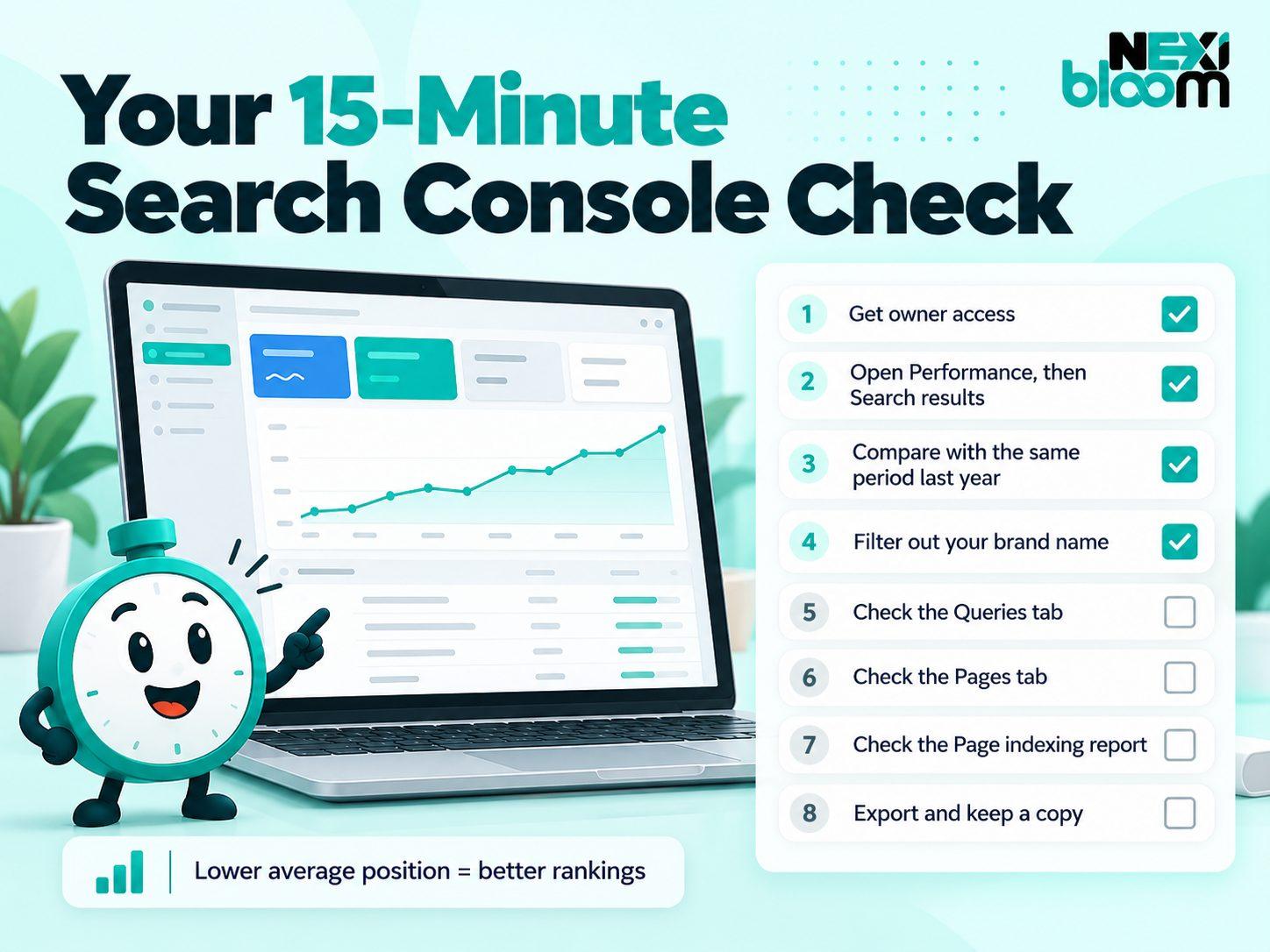
You do not need to rely on anyone else's summary. Search Console is free, and once you know where to look, checking it takes about 15 minutes a month.
1. Make sure you have your own access. Ideally, you should be an owner of your Search Console property, not just a user that the agency added. If you do not have access at all, ask for it. Any legitimate agency will set it up without hesitation.
2. Open the Performance report. In the left-hand menu, go to Performance and choose Search results. You will see four totals across the top: clicks, impressions, average CTR and average position.
3. Compare the right periods. Click the date filter and choose the Compare tab. Compare the last three months with the same three months last year. Comparing with last year, rather than last month, removes the normal seasonal ups and downs of your business.
4. Filter out your brand name. Click "Add filter," choose Query, and set it to show queries that do not contain your company name. If people often misspell your name or use a short version, you may need to filter those out too. What is left is roughly the search traffic the SEO work is responsible for. This is the number to watch.
5. Check the Queries tab. Below the chart, look at the list of searches. Are the searches that bring in business, such as your main services and areas, gaining impressions and clicks? Or is the growth coming from irrelevant searches?
6. Check the Pages tab. Which pages gained clicks? Are they the pages the agency says it worked on? If the agency reports lots of new content but none of those pages appear here after several months, ask why.
7. Check the Page indexing report. Under Indexing in the left-hand menu, open Pages. Look at the list of pages that are not indexed and the reasons given. If important service pages appear there, that is worth raising.
8. Export and keep a copy. Use the Export button to save the data each month. Over time, your own records become the most reliable history of your SEO.
What healthy trends look like. Impressions usually rise first, as Google starts showing your pages in more searches. Clicks follow as your rankings improve. One thing confuses almost everyone: a falling average position number is good news. Position 3 is better than position 8, so when the number goes down, your rankings have gone up.
If you run a local service business, you can combine this with a quick monthly check of your Business Profile calls and a handful of key rankings. We describe the five numbers we suggest checking every month in our guide for Houston plumbers, and the same approach works for most local businesses.
If you want to raise the question without starting an argument, this email does it politely and clearly. Copy it, adjust the details and send it a few days before your next monthly call.
Subject: Reports for our next monthly review

Hi [Name],

Ahead of our next call, could you please send the following:

1. A Search Console performance export for the last three months compared with the same period last year, with searches containing our brand name filtered out.
2. The number of calls and form submissions from organic search this month, and which pages they came from.
3. Our Google Business Profile performance: calls, website clicks and direction requests, compared with the previous period and last year.
4. Rankings for an agreed, fixed list of our most important searches. If we don't have that list yet, could we agree one on the call?
5. A list of all work completed this month, with the URL for each new or changed page and each link earned.
6. Any important pages that aren't indexed, and the reasons.

I'd also like to talk through three questions:
- What is the plan for next month, and why?
- What results do you expect over the next three to six months?
- Can you confirm we own our Search Console, Analytics and Business Profile accounts?

Thanks,
[Your name]
A good agency will welcome this. It shows you are engaged, and it gives them a chance to show their work properly.
Before you draw conclusions, rule out a few common reasons why sound work can look weak on paper.
None of these is an excuse for a poor agency, but each one is worth checking before you decide.
Good SEO is a two-way relationship, and the questions your agency asks you are a useful test too. A strong agency will want to know which services make you the most money, which areas you most want to grow in — whether that means a focused market like Sugar Land or a broader metro-wide push — what a typical customer is worth, and whether the leads coming in are the right kind. It will ask you for feedback on lead quality, and it will change its priorities based on your answers.
If your agency has never asked you any of this, it may be optimizing for numbers that look good in a report rather than for the business you actually want. That is worth a conversation.
Not every disappointing month means your agency is failing. SEO has slow quarters, algorithm updates and competitors who suddenly invest more. An agency that tells you plainly that results were flat, explains why and sets out a plan is behaving exactly as it should. Honest bad news is a good sign.
Some responses, though, should worry you:
Google's guidance on working with an SEO covers many of these warning signs too, and it is worth reading if you have concerns.
Once you have the reports, you will usually find yourself in one of three situations.
| What you see | What it likely means | What to do |
|---|---|---|
| Early months, work is itemized, leading indicators are rising | Normal groundwork | Give it more time, and keep checking monthly |
| Work is happening, but on the wrong searches or services | Priorities are misaligned | Reset priorities together and agree a fixed ranking list |
| No itemized work, no access to your data, vague answers | It is not working | Plan your exit |
If you genuinely cannot tell which situation you are in, an independent review can help. A one-off independent SEO audit from someone with no stake in the outcome can confirm whether the work is sound, and it costs far less than another six months of uncertainty.

If you decide to move on, protect your business before you give notice.
When you start looking for a replacement, the same six reports make a useful test. Ask any new agency to show you an example of each. You will also find practical advice on how to choose an SEO company in our guide on the subject. If you are weighing a local firm, the points on hiring a local SEO agency are a good place to start.
This week, send the email above and spend 15 minutes in Search Console before your next call. The answers you get back will tell you more than any report has so far. And if you would like a second pair of eyes on what comes back, we are always happy to explain plain-English SEO reporting and what the numbers mean.