- 10919 Stancliff Rd, Apt 4107 Houston, TX 77099
- [email protected]

Office Address
10919 Stancliff Rd, Apt 4107 Houston, TX 77099
10919 Stancliff Rd, Apt 4107 Houston, TX 77099
 by Nexi Bloom LLC

If you are a plumber, roofer, electrician, cleaner, landscaper or any kind of business that goes to your customers rather than the other way round, your Google Business Profile works a little differently from a shop or restaurant. You probably run the business from home, a small office or a yard, and nobody ever walks through your door.
Google has specific rules for businesses like yours. Follow them, and your profile can bring in a steady stream of calls from people nearby. Get them wrong, and your profile can be suspended, which has a habit of happening right when you need the phone to ring most.
This guide explains whether you count as a service-area business, what to do with your address, how to set your service areas, how to get verified without a storefront, the mistakes that trigger suspensions and how to recover if it happens to you.
Key takeaways
- If customers do not come to your address, hide it on your profile.
- Google still needs a real address behind the scenes, and PO boxes and virtual offices are not allowed.
- You can add up to 20 service areas, within about two hours' drive of your base.
- Use your real business name, with no extra keywords.
- Verify by video if you can, with your vehicle, tools and documents ready.
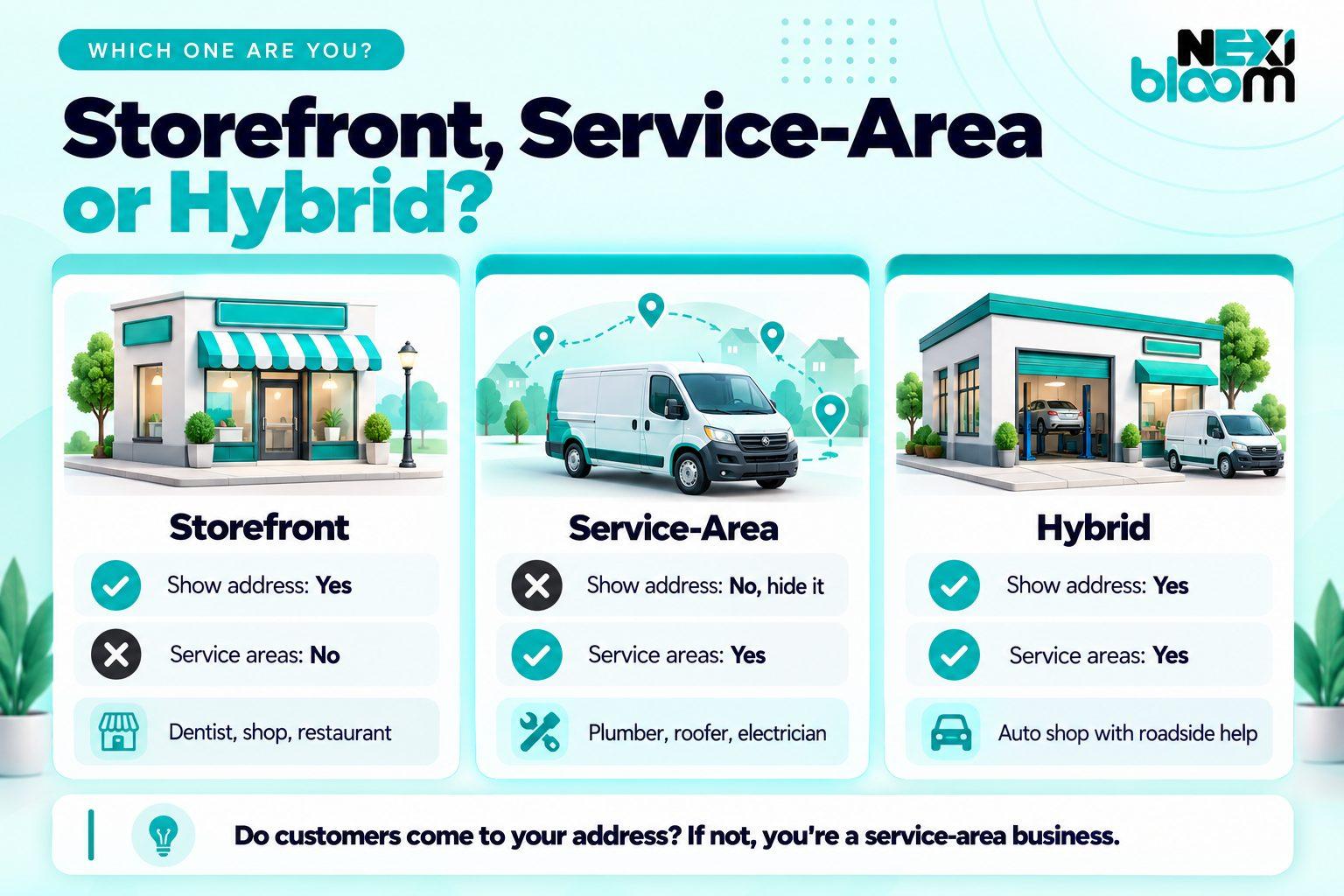
Google describes a service-area business as one that visits or delivers to customers directly but does not serve customers at its business address. Plumbers, roofers, mobile mechanics, cleaners and pest control companies are typical examples.
Some businesses do both. An auto repair shop with a garage that also offers roadside help, or an HVAC company with a showroom that also sends technicians to homes, is what Google calls a hybrid business. According to Google's guidelines for service-area businesses, hybrid businesses "can show their storefront address and designate a service area on their Business Profile."
| Business type | Show your address? | Add service areas? | Examples |
|---|---|---|---|
| Storefront | Yes | No | Dentist, restaurant, retail shop |
| Service-area business | No, hide it | Yes | Plumber, roofer, electrician, cleaner |
| Hybrid | Yes | Yes | Auto repair with roadside service, HVAC company with a showroom |
The key question is simple: do customers come to your address during business hours, and is someone there to serve them? If not, you are a service-area business.
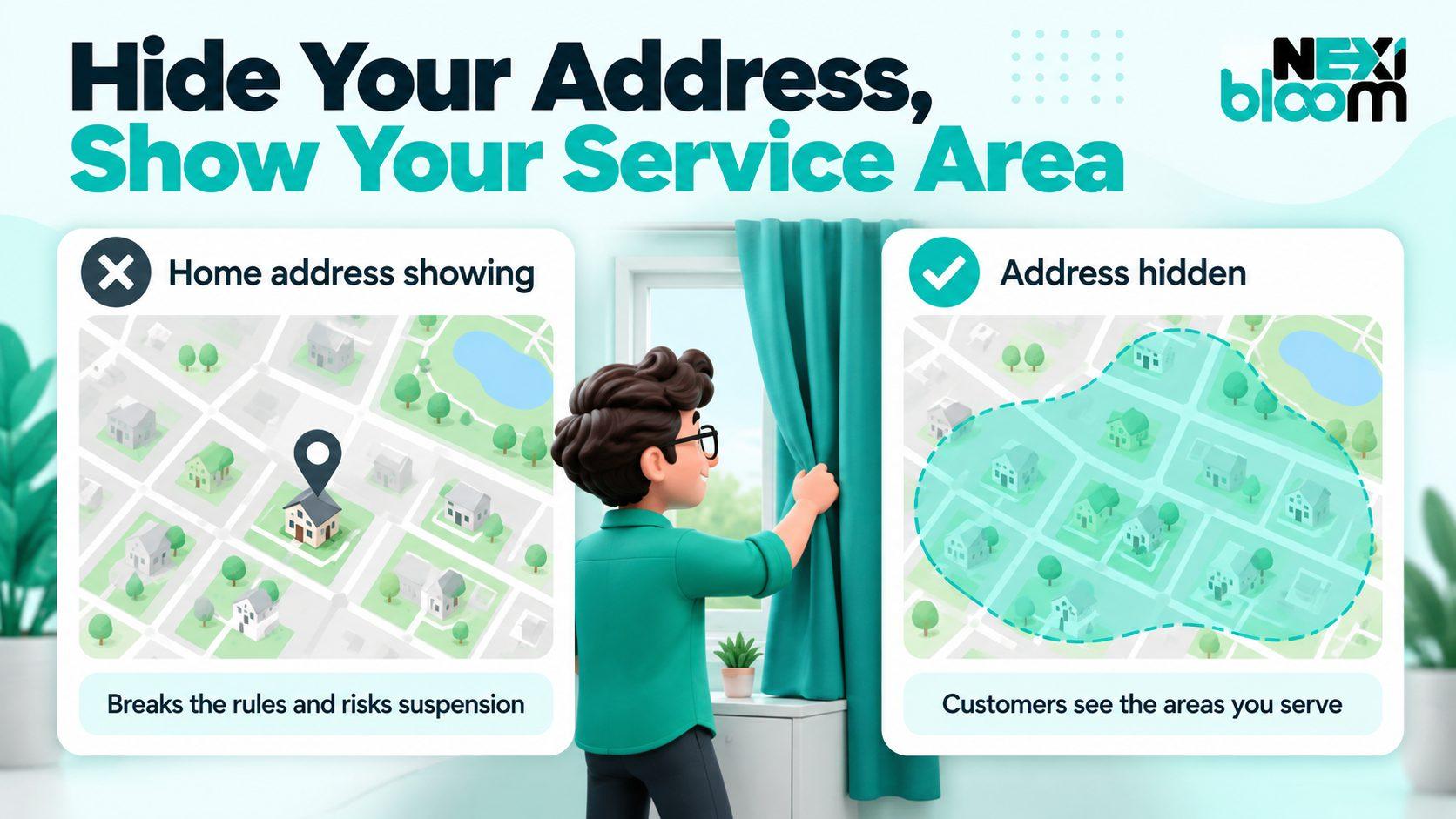
If you are a service-area business, yes. Google's guidelines are direct: "If you're a service-area business, you should hide your business address from customers."
This matters for two reasons. First, showing an address where you do not actually serve customers, such as your home, breaks Google's rules, and it is one of the most common reasons service businesses have their profiles suspended. Second, it protects your privacy. Most owners who run a business from home would rather strangers did not see their front door on Google Maps.
When your address is hidden, customers do not see a pin on the map. Instead, Google shows a shaded area covering the places you serve. Your phone number, website, hours, reviews and services all still appear as normal, so hiding the address does not make you look any less established.
It is also sensible to keep your website consistent. If your address is hidden on Google, avoid publishing your home street address prominently on your website. Show the city you are based in and the areas you serve instead. This is not a Google rule, but it keeps your business details consistent across the web and protects your privacy.
Hiding your address does not mean you do not need one. Google still asks for a real address when you set up your profile. It uses that address to verify that your business exists, even though customers never see it.
That address has to be a genuine place where your business operates. Google's guidelines rule out several common shortcuts:
For most service businesses, the right answer is simply the real place you work from, whether that is your home, a workshop or a yard.
There is one more thing worth knowing. Many local SEO specialists have observed that the hidden address still acts as a kind of center point for your business in local results, which is one reason businesses tend to rank more easily near their base than at the far edges of their service area. Google has not said this officially, so treat it as a widely observed pattern rather than a rule. It is another reason to use your genuine address rather than one chosen to look closer to a big city.
Once your address is hidden, you tell Google where you work by setting service areas. Google's rules here are clear. You can add up to 20 service areas, and you set them by city, postal code or another type of area. You cannot set a radius around your base. Google also says the boundaries of your overall area "shouldn't be more than about 2 hours of driving time" from where your business is based, although it notes that larger areas may be appropriate for some businesses.
List the areas you genuinely serve and can reach promptly. A Houston plumber based in the southwest of the city might list Houston, Sugar Land, Missouri City, Stafford, Bellaire and Pearland, rather than every city within a two-hour drive. A roofing company based in the northwest might focus on Cypress, Katy, Tomball, Jersey Village and Spring.
Avoid listing your whole state or areas you rarely visit. It does not help you rank there, it frustrates customers you cannot reach in time, and it can draw attention to your profile for the wrong reasons.
This is one of the most common misunderstandings. Service areas tell customers where you work, and they shape the shaded area shown on the map. They are not a lever that makes you rank in every area you list.
Google's local results are still based on relevance, distance and prominence. Adding a city to your service areas will not, on its own, make you appear at the top of the map pack there. To be found more widely, you need useful pages on your website for the areas you serve, reviews from customers in those areas and a strong, complete profile. Service areas are the starting point, not the whole strategy.
Before your profile can appear properly on Google, it needs to be verified. Google offers several verification options, depending on your business: phone or text message, email, a live video call and a postcard sent by mail. Google notes that most postcard codes arrive within 14 days, and that verification reviews can take up to five business days.
Where you are eligible, Google recommends video verification. For a storefront, that usually means filming the sign outside. For a service-area business without a storefront, it means showing other proof that your business is real. Before you start, have these ready:
Plan to record one continuous video without cuts, moving from your vehicle to your tools to your documents. And avoid changing lots of profile details just before or during verification, since major edits can trigger extra checks.
Once you are verified, a complete, accurate profile helps both customers and Google understand what you do.
Primary category. Choose the category that matches your main service, such as Plumber, Roofing contractor or Electrician. It has more influence than anything else on which searches you appear for. Add secondary categories only for work you genuinely do.
Services. List each service separately, with a short description. A roofer might list roof replacement, roof repair, storm damage repair and gutter installation as individual services, rather than one general entry.
Business name. Use your real business name exactly as it appears on your signage, vehicles and paperwork. Adding keywords, such as "Smith Plumbing Houston Emergency Plumber 24/7," is against Google's guidelines and a common reason profiles are suspended.
Description and hours. Write a plain, helpful description of what you do and where. Keep your hours accurate, and only list 24/7 availability if someone genuinely answers the phone at night.
Photos, posts and reviews. Add real photos of your team, vehicles and finished work, post occasional updates, and ask every customer for a review. Reply to reviews, including the critical ones.
If you would rather have this set up and managed for you, our team provides local SEO for service-area businesses.
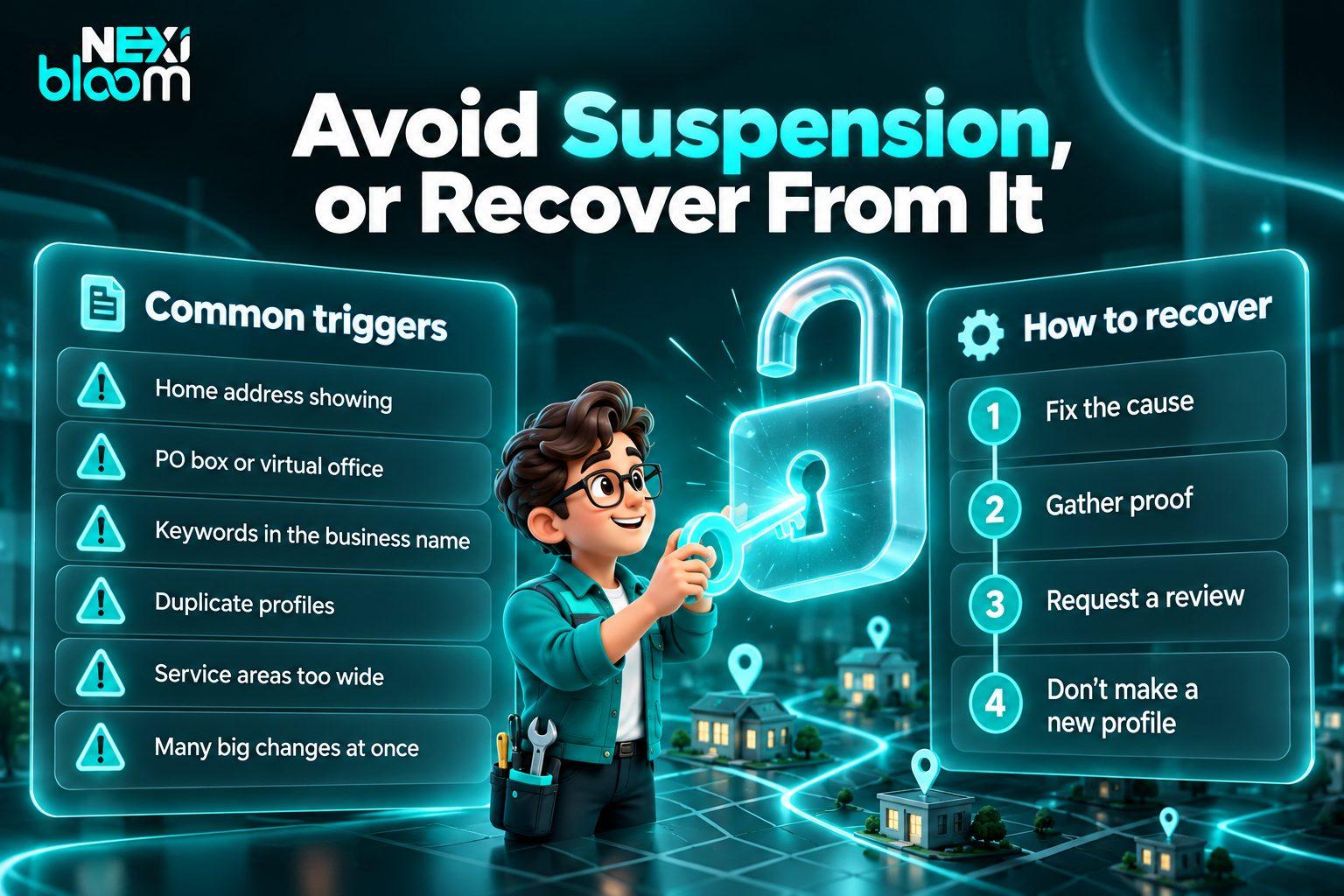
A suspension removes or restricts your profile, and for a business that depends on calls from Google, it can hurt fast. These are the most common causes for service businesses:
Stay calm and work through it methodically.
Reinstatement times vary, and there is no guaranteed timeline, so the best protection is avoiding the triggers in the first place.
If your business has more than one base, you can have a profile for each, but only if each location has its own service areas and its own staff. A single team working from one base should have one profile, even if it serves a large area.
If you move your base, update the hidden address carefully in your profile settings and expect Google to ask you to verify again. Update your address everywhere else your business is listed at the same time, so your details stay consistent.
Your profile and your website work together. For a service-area business, your website should do three things well.
First, give each main service its own page, explaining the work clearly. Second, create genuine pages for your most important areas, with real information about the homes, common problems and recent jobs there, rather than copies of the same page with a different city name. Third, make it easy to call you on a phone, with a tap-to-call number at the top of every page.
Keep your business name, phone number and service areas consistent between your website and your profile. If you need help, our team builds fast, mobile-friendly websites and writes service and area page copy for local service businesses.
The rules above apply to every service-area business, but each trade has its own details worth getting right.
Plumbers. Only list 24/7 hours if you genuinely answer emergency calls at night, and make sure your freeze-related services are listed before winter. We cover timing and emergency pages in detail in our guide to SEO for Houston plumbers.
HVAC companies. If you have a showroom that customers visit during business hours, you may be a hybrid business and can show your address. Get your profile in shape well before the summer rush, and see our HVAC SEO guide for a full seasonal strategy.
Roofers. Reviews carry unusual weight in roofing, and storm season brings surges of both work and scrutiny. Keep your service areas realistic so storm-season customers are ones you can actually reach. Our roofing SEO guide covers how to build visibility before the next storm.
Electricians. List specialist services such as EV charger installation, panel upgrades and generator installation separately, and display your license number on your profile and website. Our electrician SEO guide explains how to win those high-value jobs online.
Take five minutes to check your profile now. Is your address hidden? Do you have no more than 20 realistic service areas? Is your business name free of extra keywords? Do you have exactly one profile? If any answer is no, fix it before it becomes a problem. And if you would like help with the rest, our local SEO for service-area businesses covers profile setup, service areas and ongoing management.